SMSBridge is a small Android app that forwards every incoming SMS to a Telegram bot chat, so you can read your Android phone's messages (OTPs, bank alerts, normal texts) on an iPhone, or anywhere Telegram runs.
- Package:
com.rrrainielll.smsbridge - Language / UI: Kotlin, Jetpack Compose (Material 3)
- Min Android: 8.0 (API 26) · Target/compile SDK: 36
- Network: only
api.telegram.org, over HTTPS. No analytics, no other servers.
Preview
| Main | Settings |
|---|---|
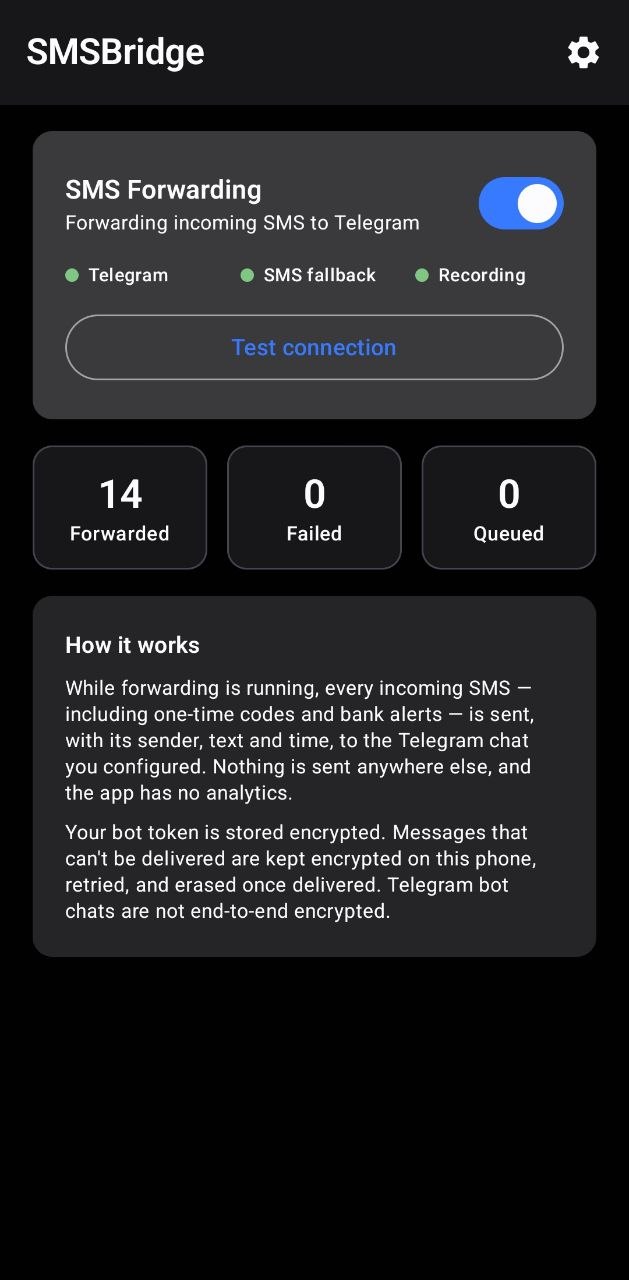 | 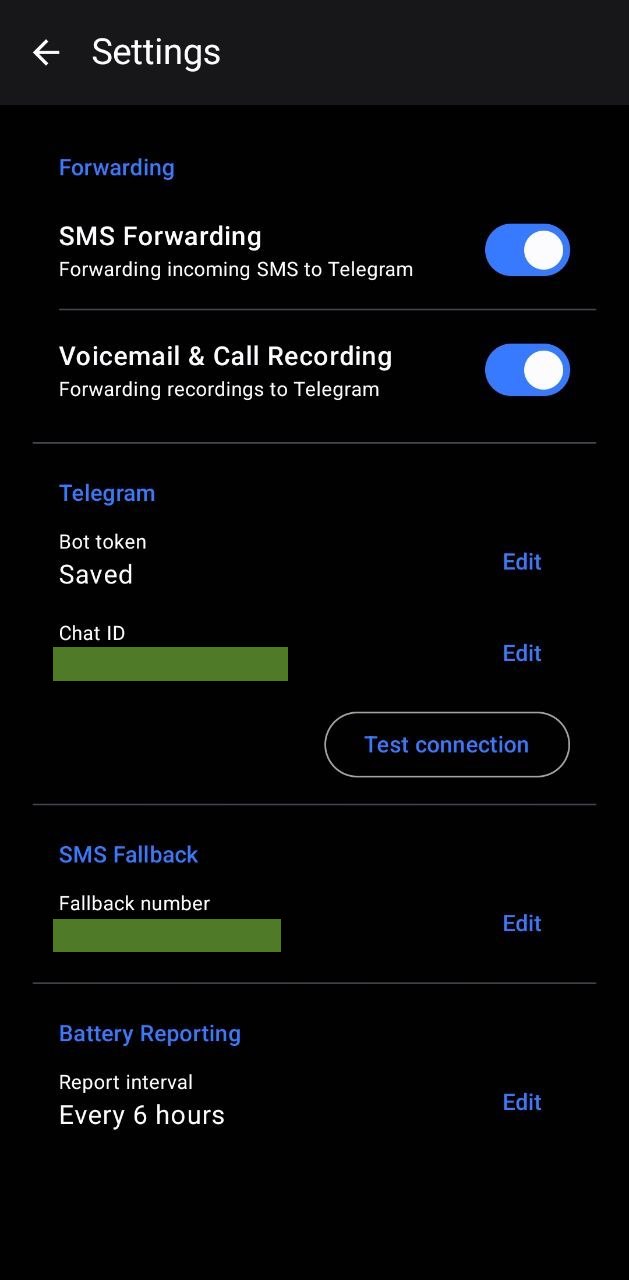 |
How it works
SMS arrives ─▶ SmsReceiver ─▶ encrypted local queue ─▶ Telegram sendMessage
                    │                  ▲                      │ failure
└─ WorkManager ────┴── retry w/ back-off ◀┘- A manifest-registered
BroadcastReceivergets everySMS_RECEIVEDbroadcast, even when the app is closed. - The message (sender, body, SMS timestamp) is written to a local SQLite queue (sender/body encrypted with an Android Keystore key). A unique hash of sender + timestamp + body prevents the same message being queued twice.
- A delivery is attempted immediately. If it fails (offline, Telegram down, rate limit) the message stays in the queue and WorkManager retries with exponential back-off as soon as a network is available. A 15-minute periodic sweep acts as a safety net. Messages are delivered in arrival order.
- Once Telegram acknowledges a message, its stored sender and text are erased (only counters remain).
- After a reboot or app update,
BootReceiverre-arms the retry schedule and flushes anything pending.
Each Telegram message looks like:
📩 SMS from +639171234567
🕒 2026-10-19 22:55:49 UTC+08:00

Your verification code is 123456
Messages longer than Telegram's limit are split into numbered parts.
Design notes
- No persistent foreground service. Android delivers
SMS_RECEIVEDto manifest receivers of apps that holdRECEIVE_SMS, with no foreground service or permanent notification required. Retries use WorkManager, which is Android's supported mechanism for deferrable, guaranteed work. "Service running" in the UI means forwarding is switched on. - Notifications are used only for one alert, "SMS forwarding needs attention" (for example the bot token was revoked). It never contains SMS content.
- Auto-backup and device-to-device transfer are disabled for the app, so credentials and queued messages never leave the phone.
Permissions
| Permission | Why |
|---|---|
RECEIVE_SMS | Detect incoming SMS (runtime permission) |
INTERNET | Talk to the Telegram Bot API |
ACCESS_NETWORK_STATE | WorkManager retries when connectivity returns |
RECEIVE_BOOT_COMPLETED | Re-arm retries after reboot |
POST_NOTIFICATIONS | Delivery-problem alert on Android 13+ (optional, runtime) |
The app does not read your SMS inbox (READ_SMS), send SMS, or access contacts.
1. Create the Telegram bot
- In Telegram, open @BotFather and send
/newbot. Pick a name and a username ending inbot. - Copy the bot token it gives you (looks like
123456789:AAH...). Treat it like a password. - Open your new bot and press Start (a bot cannot message you until you do this). Send it any message.
2. Find your chat ID
Pick one:
- Use your username add “@” first when entering your username in the app.
- Message @userinfobot (or @RawDataBot) in Telegram; it replies with your numeric ID, e.g.
123456789. - Or, after messaging your bot, open
https://api.telegram.org/bot<YOUR_TOKEN>/getUpdatesin a browser and readmessage.chat.id.
For a group, add the bot to the group, send a message, and read chat.id from getUpdates (group IDs are
negative, e.g. -1001234567890). A public channel can be given as @channelname with the bot added as admin.
⚠️ Use a private chat that only you can read: it will contain your OTPs and banking messages. Telegram bot chats use client-server encryption, not end-to-end encryption.
3. Build the debug APK
Requirements: JDK 17+ and the Android SDK (platform 36, build-tools) — or just install Android Studio.
Android Studio: File ▸ Open… this folder, let Gradle sync, then Build ▸ Build Bundle(s) / APK(s) ▸ Build APK(s).
Command line (Windows):
# One-time: tell Gradle where the SDK is (Android Studio creates this file for you)
Set-Content local.properties "sdk.dir=C\:\\Users\\<you>\\AppData\\Local\\Android\\Sdk"

.\gradlew.bat assembleDebug
macOS / Linux: ./gradlew assembleDebug (with sdk.dir=/path/to/Android/sdk in local.properties).
The APK is written to app/build/outputs/apk/debug/app-debug.apk.
4. Install on the phone
Manual Installation (Recommended):
- Download .apk from the release page.
- Allow unknown app if prompted
Via USB (adb):
- On the phone: Settings ▸ About phone, tap Build number 7 times, then enable Developer options ▸ USB debugging.
- Connect the phone, accept the debugging prompt, then:
adb install -r app\build\outputs\apk\debug\app-debug.apkAndroid 13+ "Restricted setting" (sideloaded apps)
Apps installed outside an app store (including via a file manager) may have the SMS permission greyed out or
silently denied. If so: Settings ▸ Apps ▸ SMSBridge ▸ ⋮ (top right) ▸ Allow restricted settings, then
grant the SMS permission again. Installing with adb install normally avoids this.
5. First-launch setup
- Open SMSBridge and read the short notice, then tap Continue. Allow SMS (and notifications on Android 13+).
- Tap Settings, paste the bot token and chat ID, Save.
- Tap Test connection — you should receive "✅ SMSBridge test message" in Telegram and the status turns Connected.
- Tap Start forwarding. You're done; the app can be closed.
- Recommended: open Battery settings from the app and set SMSBridge to Unrestricted / not optimised (see limitations below).
Troubleshooting
| Symptom | What to check |
|---|---|
| "Telegram rejected the bot token" | Token mistyped or revoked. Re-copy from @BotFather (/mybots). |
| "Could not find or use this chat ID" | Wrong ID, or you haven't pressed Start on the bot. Groups use negative IDs. |
| "The bot is not allowed to message this chat" (403) | You blocked the bot, or it was removed from the group. Unblock / re-add, then press Start. |
| Test works but real SMS don't arrive | SMS permission not granted (see restricted settings above); forwarding not started; battery restrictions; app was force-stopped. |
| Messages arrive late | The phone was offline or in deep Doze; they're queued and sent when connectivity returns. Check Queued on the main screen and tap Retry now. |
| "Failed" count > 0 | Delivery failed and the message is waiting for retry (or Telegram rejected it). Retry now re-queues them. |
| Nothing after a reboot | Open the app once after boot if you have an aggressive manufacturer battery manager (see below). |
The app deliberately logs no tokens, phone numbers or message text. For diagnostics, rely on the status line on the main screen.
Known Android limitations
- Force-stop: if you force-stop the app (or a "cleaner" app does), Android blocks all its receivers until you open it again.
- Manufacturer battery managers (Xiaomi, Oppo/Realme/OnePlus, Vivo, Huawei, Samsung "sleeping apps", etc.) can kill or restrict background apps. Set SMSBridge to Unrestricted/No restrictions, enable Autostart where your phone offers it, and lock the app in Recents. See dontkillmyapp.com.
- Before first unlock: after a reboot, SMS that arrive before you unlock the phone for the first time may not be seen by the app (credential-encrypted storage is unavailable until then).
- Doze / no network: retries run when Android's scheduler allows; very long offline periods mean delayed (not lost) delivery.
- Other SMS apps / RCS: only classic SMS/MMS-text broadcasts are intercepted. RCS ("chat features") messages and messages in other apps (WhatsApp etc.) are not SMS and can't be forwarded.
- Dual SIM: messages from both SIMs are forwarded; the SIM slot isn't included in the Telegram text.
- Google Play: distributing an SMS-forwarding app on Google Play requires a policy exception; this project is intended for personal sideloading.
- Telegram limits: about 1 message/second per chat; SMSBridge paces bulk deliveries accordingly.
- Duplicates: a message is marked as sent only after Telegram confirms. If the connection drops after Telegram received it but before the confirmation reached the phone, that one message could be sent twice rather than lost.
Privacy & security
- The bot token and chat ID are encrypted with an AES-256-GCM key held in the Android Keystore; the token is never displayed again after saving.
- Queued SMS content is encrypted at rest and erased after successful delivery.
- No tokens or SMS content are written to logs or notifications. HTTPS only (cleartext traffic is disabled).
- Backups and device-transfer of app data are disabled.
- To remove everything: uninstall the app, and revoke the bot's token in @BotFather (
/revoke) if the phone is lost.
Project layout
app/src/main/java/com/rrrainielll/smsbridge/
  SmsBridgeApp.kt            Application, notification channel
  Notifier.kt                "needs attention" alert (no SMS content)
  receiver/SmsReceiver.kt    SMS_RECEIVED → queue → deliver
  receiver/BootReceiver.kt   re-arm retries after boot / update
  work/Deliverer.kt          ordered, lock-protected delivery + message formatting
  work/DeliveryWorker.kt     WorkManager worker
  work/Scheduler.kt          one-time + periodic work
  net/TelegramClient.kt      Bot API sendMessage + error classification
  data/Crypto.kt             Keystore AES-GCM
  data/SecureSettings.kt     encrypted credentials + flags
  data/MessageStore.kt       SQLite queue with de-duplication
  ui/                        MainActivity, MainScreen (Compose), ViewModel, theme